

目录
- reStructuredText 渲染器
- 与Text一起使用
- 使用源代码
RstDocumentRstDocument.background_colorRstDocument.base_font_sizeRstDocument.colorsRstDocument.document_rootRstDocument.goto()RstDocument.preload()RstDocument.render()RstDocument.resolve_path()RstDocument.show_errorsRstDocument.sourceRstDocument.source_encodingRstDocument.source_errorRstDocument.textRstDocument.titleRstDocument.toctreesRstDocument.underline_color
reStructuredText 渲染器
在 1.1.0 版本加入.
reStructuredText 是一种易读、所见即所得的纯文本标记语法和解析器系统。
备注
该控件需要 docutils 包才能运行。请使用 pip 安装它,或将其作为部署要求之一包含在内。
警告
此控件高度实验性。在移除本警告之前,其样式和实现不应被视为稳定。
与Text一起使用
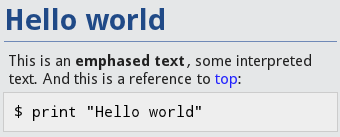
text = """
.. _top:

Hello world
===========

This is an **emphased text**, some ``interpreted text``.
And this is a reference to top_::

    $ print("Hello world")

"""
document = RstDocument(text=text)
渲染结果将输出:
使用源代码
你也可以使用 source 属性来渲染一个 rst 文件:
document = RstDocument(source='index.rst')
您可以使用角色 :doc: 来引用其他文档。例如,在文档 index.rst 中,您可以这样写:
Go to my next document: :doc:`moreinfo.rst`
它将生成一个链接,点击该链接将打开 moreinfo.rst 文档。
- class kivy.uix.rst.RstDocument(**kwargs)[源代码]
基类:
ScrollView用于存储Rst文档的基础组件。更多信息请参阅模块文档。
- background_color
指定用于RstDocument的背景颜色。
在 1.8.0 版本加入.
background_color是 colors['background'] 的一个AliasProperty。
- base_font_size
最大标题的字体大小,默认值为31。所有其他字体大小均由此派生。
在 1.8.0 版本加入.
- colors
RST渲染中使用的所有颜色的字典。
警告
这个字典需要特殊处理。如果在加载后更改了它们,你还需要调用
RstDocument.render()。colors是一个DictProperty。
- document_root
Root path where :doc: will search for rst documents. If no path is given, it will use the directory of the first loaded source file.
document_root是一个StringProperty,默认值为 None。
- goto(ref, *largs)[源代码]
滚动到引用处。如果未找到,则不执行任何操作。
请提供需要翻译的英文文本内容。
.. _myref:

This is something I always wanted.
您可以这样做:
from kivy.clock import Clock
from functools import partial

doc = RstDocument(...)
Clock.schedule_once(partial(doc.goto, 'myref'), 0.1)
备注
如果你刚刚加载了文档,最好延迟调用 goto,因为布局可能尚未完成,或者 RstDocument 的大小还未确定。在这两种情况下,滚动计算都会出错。
不过,如果文档已经加载完成,你也可以直接调用。
在 1.3.0 版本加入.
- preload(filename, encoding='utf-8', errors='strict')[源代码]
预加载一个rst文件,以获取其目录树和标题。
结果将存储在
toctrees中,以filename作为键。
- show_errors
指示RST解析器的错误是否应在屏幕上显示。
show_errors是一个BooleanProperty,默认值为 False。
- source
RST文档的文件名。
source是一个StringProperty,默认值为 None。
- source_encoding
用于
source文件的编码。source_encoding是一个StringProperty,默认值为 utf-8。备注
您有责任确保所提供的值是Python支持的有效编解码器。
- source_error
编码
source文件时要使用的错误处理方式。source_error是一个OptionProperty,默认值为 strict。可选值包括 'strict'、'ignore'、'replace'、'xmlcharrefreplace' 或 'backslashreplac'。
- text
文档的RST标记文本。
text是一个StringProperty,默认值为 None。
- title
当前文档的标题。
title是一个StringProperty,默认值为 ''。它是只读的。
- toctrees
所有已加载或预加载文档的toctree。当显式加载rst文档或调用:meth:`preload`时,此字典会被填充。
如果文档没有文件名,例如当文档从文本文件加载时,键将为''。
toctrees是一个DictProperty,默认值为 {}。
- underline_color
标题下划线颜色,以HTML颜色表示法表达。
underline_color是一个StringProperty,默认值为 '204a9699'。