

目录
- 文件选择器
- 简单控件
- 控件组合
- 使用示例
FileChooserFileChooserControllerFileChooserController.cancel()FileChooserController.dirselectFileChooserController.entry_released()FileChooserController.entry_touched()FileChooserController.file_encodingsFileChooserController.file_systemFileChooserController.filesFileChooserController.filter_dirsFileChooserController.filtersFileChooserController.font_nameFileChooserController.get_nice_size()FileChooserController.layoutFileChooserController.multiselectFileChooserController.on_touch_down()FileChooserController.on_touch_up()FileChooserController.pathFileChooserController.progress_clsFileChooserController.rootpathFileChooserController.selectionFileChooserController.show_hiddenFileChooserController.sort_func
FileChooserIconLayoutFileChooserIconViewFileChooserListLayoutFileChooserListViewFileChooserProgressBaseFileSystemAbstractFileSystemLocal
文件选择器
FileChooser 模块提供了多种类,用于描述、显示和浏览文件系统。
简单控件
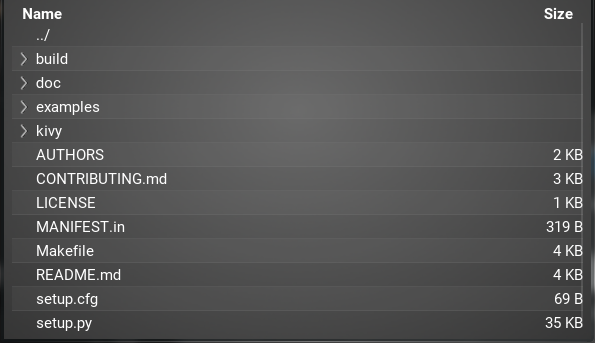
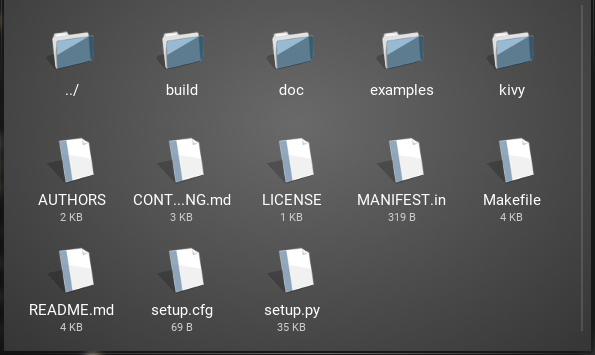
有两个现成的控件可用于展示文件系统的视图。它们各自以不同的风格呈现文件和文件夹。
:类`FileChooserListView`将文件条目以文本项的形式显示在垂直列表中,其中文件夹可以折叠和展开。
FileChooserIconView 从左到右显示图标和文本,并根据需要自动换行。
两者均支持滚动、选择及基本用户交互。有关支持的事件和属性的详细信息,请参阅 FileChooserController。
控件组合
FileChooser 类采用了 MVC 设计模式。它们被公开,以便您可以根据需要扩展和自定义您的文件选择器。
FileChooser 类可按如下方式分类:
模型由
FileSystemAbstract类的具体实现来表示,例如FileSystemLocal。视图由
FileChooserListLayout和FileChooserIconLayout类表示。它们分别被FileChooserListView和FileChooserIconView控件使用。控制器由
FileChooserController的具体实现来表示,即FileChooser、FileChooserIconView和FileChooserListView类。
这意味着你可以定义自己的视图,或为这些控件提供替代文件系统的:class:`FileSystemAbstract`实现。:class:`FileChooser`可以作为控制器,用于处理同一路径下的多个同步视图。通过组合这些元素,你可以添加自己的视图和文件系统,并使其与现有组件轻松交互。
使用示例
main.py
from kivy.app import App
from kivy.uix.floatlayout import FloatLayout
from kivy.factory import Factory
from kivy.properties import ObjectProperty
from kivy.uix.popup import Popup

import os


class LoadDialog(FloatLayout):
    load = ObjectProperty(None)
    cancel = ObjectProperty(None)


class SaveDialog(FloatLayout):
    save = ObjectProperty(None)
    text_input = ObjectProperty(None)
    cancel = ObjectProperty(None)


class Root(FloatLayout):
    loadfile = ObjectProperty(None)
    savefile = ObjectProperty(None)
    text_input = ObjectProperty(None)

    def dismiss_popup(self):
        self._popup.dismiss()

    def show_load(self):
        content = LoadDialog(load=self.load, cancel=self.dismiss_popup)
        self._popup = Popup(title="Load file", content=content,
                            size_hint=(0.9, 0.9))
        self._popup.open()

    def show_save(self):
        content = SaveDialog(save=self.save, cancel=self.dismiss_popup)
        self._popup = Popup(title="Save file", content=content,
                            size_hint=(0.9, 0.9))
        self._popup.open()

    def load(self, path, filename):
        with open(os.path.join(path, filename[0])) as stream:
            self.text_input.text = stream.read()

        self.dismiss_popup()

    def save(self, path, filename):
        with open(os.path.join(path, filename), 'w') as stream:
            stream.write(self.text_input.text)

        self.dismiss_popup()


class Editor(App):
    pass


Factory.register('Root', cls=Root)
Factory.register('LoadDialog', cls=LoadDialog)
Factory.register('SaveDialog', cls=SaveDialog)


if __name__ == '__main__':
    Editor().run()
editor.kv
#:kivy 1.1.0

Root:
    text_input: text_input

    BoxLayout:
        orientation: 'vertical'
        BoxLayout:
            size_hint_y: None
            height: 30
            Button:
                text: 'Load'
                on_release: root.show_load()
            Button:
                text: 'Save'
                on_release: root.show_save()

        BoxLayout:
            TextInput:
                id: text_input
                text: ''

            RstDocument:
                text: text_input.text
                show_errors: True

<LoadDialog>:
    BoxLayout:
        size: root.size
        pos: root.pos
        orientation: "vertical"
        FileChooserListView:
            id: filechooser

        BoxLayout:
            size_hint_y: None
            height: 30
            Button:
                text: "Cancel"
                on_release: root.cancel()

            Button:
                text: "Load"
                on_release: root.load(filechooser.path, filechooser.selection)

<SaveDialog>:
    text_input: text_input
    BoxLayout:
        size: root.size
        pos: root.pos
        orientation: "vertical"
        FileChooserListView:
            id: filechooser
            on_selection: text_input.text = self.selection and self.selection[0] or ''

        TextInput:
            id: text_input
            size_hint_y: None
            height: 30
            multiline: False

        BoxLayout:
            size_hint_y: None
            height: 30
            Button:
                text: "Cancel"
                on_release: root.cancel()

            Button:
                text: "Save"
                on_release: root.save(filechooser.path, text_input.text)
在 1.0.5 版本加入.
在 1.2.0 版本发生变更: 在选择器模板中,controller 不再是一个直接引用,而是一个弱引用。如果您正在升级,应将 root.controller.xxx 的写法改为 root.controller().xxx。
- class kivy.uix.filechooser.FileChooser(**kwargs)[源代码]
-
实现一个支持在多个同步布局视图之间切换的
FileChooserController。FileChooser 可以按以下方式使用:
BoxLayout:
    orientation: 'vertical'

    BoxLayout:
        size_hint_y: None
        height: sp(52)

        Button:
            text: 'Icon View'
            on_press: fc.view_mode = 'icon'
        Button:
            text: 'List View'
            on_press: fc.view_mode = 'list'

    FileChooser:
        id: fc
        FileChooserIconLayout
        FileChooserListLayout
在 1.9.0 版本加入.
- add_widget(widget, *args, **kwargs)[源代码]
将此控件添加为该控件的子控件。
- 参数:
- widget:
Widget 要添加到我们子控件列表中的控件。
- index:整数,默认值为0
在列表中插入控件的索引。请注意,默认值0意味着控件被插入到列表的开头,因此会绘制在其他同级控件之上。关于索引和控件层次结构的完整讨论,请参阅 控件编程指南。
在 1.0.5 版本加入.
- canvas:字符串,默认为 None
用于添加控件画布的Canvas。可以是'before'、'after'或None(默认画布)。
在 1.9.0 版本加入.
- widget:
>>> from kivy.uix.button import Button
>>> from kivy.uix.slider import Slider
>>> root = Widget()
>>> root.add_widget(Button())
>>> slider = Slider()
>>> root.add_widget(slider)
- manager
对
ScreenManager实例的引用。manager 是一个
ObjectProperty。
- view_list
添加到该FileChooser中的视图列表。
view_list 是一个类型为
list的AliasProperty。
- view_mode
当前布局视图模式。
view_mode 是一个类型为
str的AliasProperty。
- class kivy.uix.filechooser.FileChooserController(**kwargs)[源代码]
-
实现FileChooser的基类。请勿直接使用此类,而应优先使用诸如:class:FileChooser、:class:`FileChooserListView`或:class:`FileChooserIconView`等实现。
- 事件:
- on_entry_added: entry, parent
当文件列表中添加了一个根级条目时触发。如果你在此事件中返回True,则该条目不会被添加到FileChooser中。
- on_entries_cleared
当条目列表被清空时触发,通常在根节点刷新时发生。
- on_subentry_to_entry: entry, parent
当向现有条目添加子条目或从条目中移除条目时触发,例如当节点关闭时。
- on_submit:selection, touch
当通过双击选中文件时触发。
- dirselect
确定目录是否为有效选择。
dirselect 是一个
BooleanProperty,默认值为 False。在 1.1.0 版本加入.
- file_encodings
用于将文件名解码为Unicode的可能编码。当用户拥有非ASCII文件名,且在不了解其原始编码的情况下无法解码时,我们别无选择,只能进行猜测。
请注意,如果您在此处遇到因缺少编码而导致的问题,我们很乐意将其添加到这个列表中。
file_encodings 是一个
ListProperty,默认值为 ['utf-8', 'latin1', 'cp1252']。在 1.3.0 版本加入.
自 1.8.0 版本弃用: 该属性不再使用,因为文件选择器不再对文件名进行解码。
- file_system
用于访问文件系统的文件系统对象。这应该是
FileSystemAbstract的子类。file_system 是一个
ObjectProperty,默认值为FileSystemLocal()。在 1.8.0 版本加入.
- files
应用过滤器后,指定路径目录中的文件列表。
files 是一个只读的
ListProperty。
- filter_dirs
指示过滤器是否也应应用于目录。filter_dirs 是一个
BooleanProperty,默认值为 False。
- filters
filters 指定应用于目录中文件的过滤器。filters 是一个
ListProperty,默认值为 []。这等同于 '*',即不过滤任何内容。当路径发生变化时,过滤器不会被重置。如果需要,您需要自行重置它们。
有两种过滤器:模式过滤器和回调过滤器。
模式
例如:['*.png']。您可以使用以下模式:
模式
含义
很抱歉,您没有提供需要翻译的英文内容。请发送您希望翻译的文本,我将为您进行专业的中文翻译。
匹配所有内容
我注意到您发送的内容似乎不完整,只包含了一个问号。请提供需要翻译的英文技术文档内容,我会为您翻译成简体中文。
匹配任意单个字符
好的,请发送需要翻译的英文内容。
匹配 seq 中的任意字符。
收到,请发送需要翻译的英文内容。
匹配不在 seq 中的任意字符。
回调函数
你可以指定一个函数,该函数将对每个文件被调用。回调函数将分别以文件夹和文件名作为第一和第二个参数传入。它应返回True表示匹配,否则返回False。
在 1.4.0 版本发生变更: 新增了将过滤器指定为回调函数的选项。
- font_name
UI组件中使用的字体文件名。路径可以是绝对路径或相对路径。相对路径通过
resource_find()函数解析。font_name是一个StringProperty,默认值为 'Roboto'。该值取自Config。
- layout
对布局控件实例的引用。
layout 是一个
ObjectProperty。在 1.9.0 版本加入.
- multiselect
确定用户是否能够选择多个文件。
multiselect 是一个
BooleanProperty,默认值为 False。
- on_touch_down(touch)[源代码]
接收触摸按下事件。
- 参数:
- touch:
MotionEvent类 收到触摸事件。该触摸位于父级坐标系中。关于坐标系统的讨论,请参阅
relativelayout。
- touch:
- 返回:
bool 如果为 True,触摸事件的派发将停止。如果为 False,事件将继续派发给控件树中的其余部分。
- on_touch_up(touch)[源代码]
接收触摸抬起事件。触摸坐标位于父级坐标系中。
更多信息请参阅
on_touch_down()。
- path
path 是一个
StringProperty,默认值为当前工作目录的 unicode 字符串。它指定了此控制器应引用的文件系统路径。警告
如果指定了Unicode路径,则返回的所有文件都将采用Unicode格式,从而能够显示Unicode文件和路径。如果指定了字节路径,则只有ASCII名称的文件和路径才能正确显示:非ASCII文件名将以问号(?)代替其Unicode字符进行显示和列出。
- progress_cls
用于显示文件选择器加载进度指示器的类。
progress_cls 是一个
ObjectProperty,默认值为FileChooserProgress。在 1.2.0 版本加入.
在 1.8.0 版本发生变更: 如果设置为字符串,将使用
Factory来解析类名。
- rootpath
用于替代系统根路径的根路径。若设置此路径,将不会显示“..”目录以返回至根路径。例如,若将根路径设置为 /users/foo,用户将无法访问 /users 或任何不以 /users/foo 开头的其他目录。
rootpath 是一个
StringProperty,默认值为 None。在 1.2.0 版本加入.
备注
与
path类似,rootpath 是以字节还是 Unicode 字符串形式指定,将决定读取的文件名和路径的类型。
- selection
包含当前选中的文件列表。
selection 是一个只读的
ListProperty,默认值为 []。
确定是否应显示隐藏文件和文件夹。
show_hidden 是一个
BooleanProperty,默认值为 False。
- sort_func
提供一个函数,该函数接收文件名列表作为第一个参数,文件系统实现作为第二个参数。它返回一个按视图显示顺序排序的文件名列表。
sort_func 是一个
ObjectProperty,默认值为一个函数,该函数会优先返回按字母数字顺序命名的文件夹。在 1.8.0 版本发生变更: 签名现在需要2个参数:第一个是文件列表,第二个是要使用的文件系统类。
- class kivy.uix.filechooser.FileChooserIconLayout(**kwargs)[源代码]
基类:
FileChooserLayout使用图标视图的文件选择器布局。
在 1.9.0 版本加入.
- class kivy.uix.filechooser.FileChooserIconView(**kwargs)[源代码]
-
使用图标视图实现的
FileChooserController。在 1.9.0 版本加入.
- class kivy.uix.filechooser.FileChooserListLayout(**kwargs)[源代码]
基类:
FileChooserLayout使用列表视图的文件选择器布局。
在 1.9.0 版本加入.
- class kivy.uix.filechooser.FileChooserListView(**kwargs)[源代码]
-
使用列表视图实现的
FileChooserController。在 1.9.0 版本加入.
- class kivy.uix.filechooser.FileChooserProgressBase(**kwargs)[源代码]
基类:
FloatLayout实现进度视图的基础。当需要创建过多条目并延迟到多个帧中处理时,会使用此视图。
在 1.2.0 版本加入.
- on_touch_down(touch)[源代码]
接收触摸按下事件。
- 参数:
- touch:
MotionEvent类 收到触摸事件。该触摸位于父级坐标系中。关于坐标系统的讨论,请参阅
relativelayout。
- touch:
- 返回:
bool 如果为 True,触摸事件的派发将停止。如果为 False,事件将继续派发给控件树中的其余部分。
- on_touch_move(touch)[源代码]
接收触摸移动事件。触摸坐标位于父坐标系中。
更多信息请参阅
on_touch_down()。
- on_touch_up(touch)[源代码]
接收触摸抬起事件。触摸坐标位于父级坐标系中。
更多信息请参阅
on_touch_down()。
- path
FileChooser 的当前路径,只读。
- total
要加载的条目总数。
- class kivy.uix.filechooser.FileSystemAbstract[源代码]
基类:
object用于实现文件系统视图的类,可与
FileChooser一起使用。在 1.8.0 版本加入.
如果文件是隐藏的,则返回 True。
- class kivy.uix.filechooser.FileSystemLocal[源代码]
-
:针对本地文件实现的
FileSystemAbstract。在 1.8.0 版本加入.
如果文件是隐藏的,则返回 True。